
The console
one screen per job.
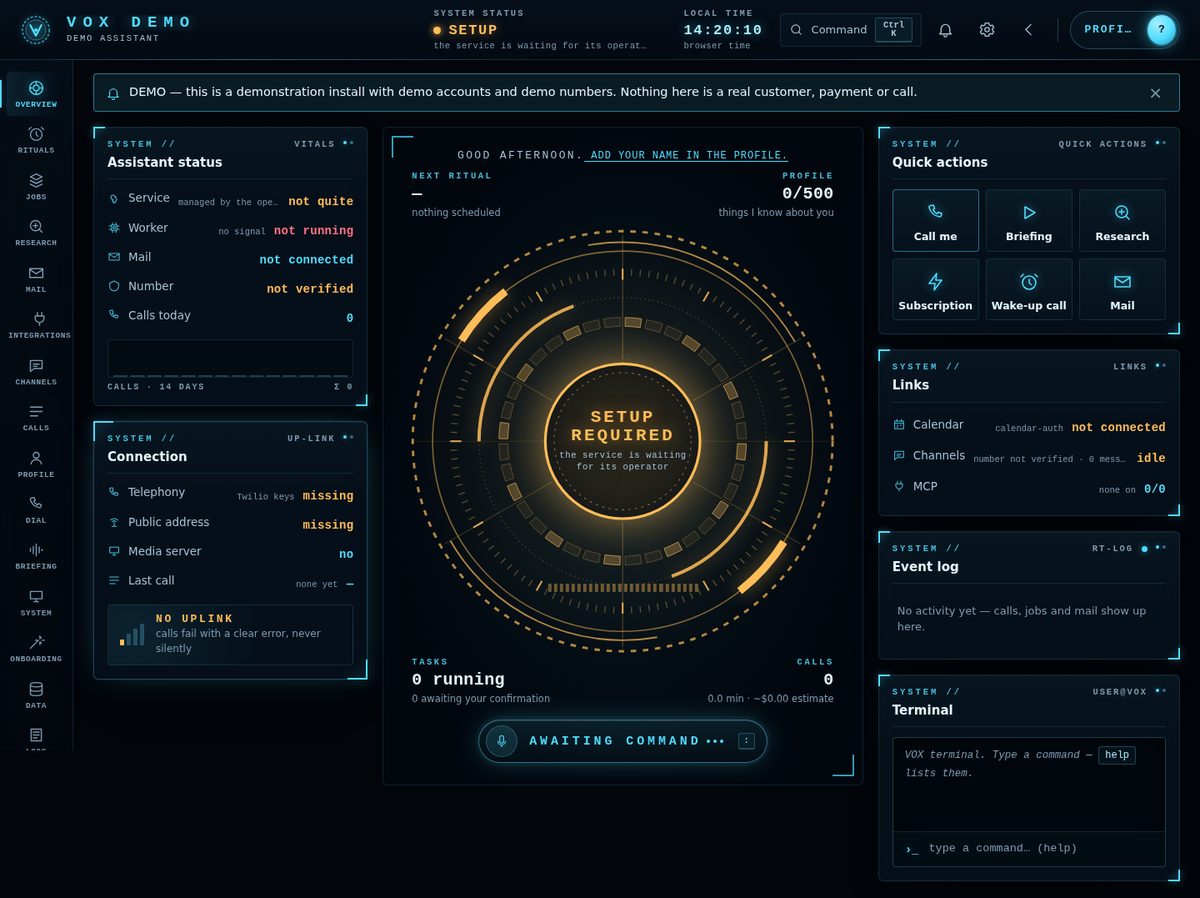
The console is where the user (single-user mode) or each customer (SaaS mode, at /app/) sets up and uses the assistant. This page follows its sidebar. In SaaS mode, operator-only parts are hidden from customers.
01Opening the console
Single-user: python -m voice up (or admin) prints VOX admin http://127.0.0.1:8766/#token=…. Open exactly that address. It listens on 127.0.0.1 only, checks the Host header (DNS-rebinding protection) and loads nothing from a CDN. Any --host other than loopback prints a loud !!! WARNING.
SaaS: customers sign up on your public site and land in their own console at /app/. It is the same console without operator-only functions: no key setup, no barge-in tuning, no MCP registry changes and no PC actions.
02Overview and terminal
Assistant status (service, worker, mail, number, calls today), connection (telephony, public address, media server, last call), the next ritual, the profile score out of 500, running tasks, and quick actions: Call me, Briefing, Research, Wake-up call, Mail.
The terminal takes English commands such as call me, briefing, research …, task …, clean up desktop, remind me at HH:MM to …, wake me at HH:MM, status. Type help for the list. Every write goes through a confirmation dialog; an unknown command is not guessed.
03Setup (single-user)
A 9-step wizard (Twilio or Telnyx): enter each key, press its live test, see what is still missing. Keys are saved to app/data/secrets.env and never shown back. See Configuration.
04Profile and number verification
The profile holds the facts VOX knows, each with its source (asked, corrected, inferred). Delete one fact, or every inferred fact with one click. A weaker source never overwrites a stronger one.
- Enter your numberWith the country code (
+…). - Verify numberVOX calls you (with the AI disclosure), reads a 6-digit code twice and hangs up.
- Type the codeValid 10 minutes, 5 attempts.
python -m voice checkthen showsverified.
Until the number is verified, even a call to yourself goes out as a third-party call with the disclosure. Changing the number cancels the verification.
05Dial, Calls and Briefing
- Dial: a preview of the ring and the exact disclosure sentence, then confirmation.
- Calls: the call list, each transcript sentence by sentence (with an interruption flag), deletion, minutes, interruption rate and a 14-day cost estimate.
- Briefing: composed from the profile (and today's calendar when connected). The console reads it aloud with the browser's own speech; nothing is sent.
Only transcripts of calls to the user come back as memory in later calls. Transcripts of third-party calls are stored but never fed to the model again.
06Jobs, Research and Rituals
| Job | What it does |
|---|---|
| Research | "Research X and call me": Claude with web search on Anthropic's side, a spoken summary of up to 90 words plus a report, only real sources. |
| Agent task | A planner splits the request into up to 4 read-only subtasks (web, calendar, mail verdicts, MCP read tools) and writes one spoken summary. Hard limits in code: 4 helpers, 6 turns and 8 tool calls each, 600k tokens and an estimated $2.50 per task. Anything to be done comes back as a proposal, never executed. |
| Desktop clean-up | Plan → preview → confirmation → move → undo. Category folders; never deletes or overwrites. |
| Rituals | Morning briefing, wake-up call (up to 3 attempts 5 minutes apart), reminder, check-in, as a call to the user on a schedule with time zone and daylight saving. At most 20. |
After a job VOX calls only the verified own number, not in quiet hours, at most 3 automatic calls per hour. A failed job always shows an error code, never a fake result. A job interrupted by a restart stays failed with INTERRUPTED; submit it again.
07Mail, Calendar and Integrations
- Mail (Gmail, read-only, scope
gmail.readonly): Claude rates importance 0–3 and phishing; rules for VIP, always call, never call and keywords. "Call me when something important arrives": at most one call per 10 minutes. Links and attachments are never opened. - Calendar: today, the next days and free slots. New events only as proposals you confirm, and only after
calendar-auth --allow-create. - MCP servers: a registry in
data/mcp.json. A server needs an SPDX licence and a "licence checked" mark before it can be enabled; write tools always create an item for confirmation (valid 1 hour).
Single-user connects Google with python -m voice mail-auth and calendar-auth. SaaS customers connect from their console through your web OAuth client (Operator panel).
08Channels
Where automatic messages go when a call did not get through: SMS, WhatsApp (Twilio only), Telegram or e-mail, chosen under Channels → Settings → Automatic messages via. Every channel reaches only the user's own verified number, chat or address; there is no recipient field anywhere. Limit: 6 messages per hour, 30 per day.
- TelegramChannels → Telegram → Link my chat. Send the one-time code (
VOX-…) to your bot in a private chat, press Find my chat, type the 6-digit code the bot sends back. For commands by Telegram, setTELEGRAM_WEBHOOK_SECRETand press Receive commands after linking. - E-mailChannels → E-mail: type your address, Send code, type the 6-digit code. Outbound only.
Text commands (SMS or Telegram, from the verified sender only): call me, research <topic>, remind me … at HH:MM, status, stop/pause, resume. A fixed list; no model decides.
Inbound calls: an unknown number hears one polite sentence and the call ends. The owner enters VOX_CALL_PIN and gets the assistant.
09Computer (single-user only)
17 file and system actions: 7 read (disk space, largest files, search, duplicates, folder summary, recent downloads, system info), 7 reversible (clean-up, rename, move, archive, set aside, folder structure, backup) and 3 with confirmation (open, notification, lock screen). Only folders you allow (at most 5, inside the home folder); no symlinks, shell commands, URLs or deletion.
Mouse and keyboard are off by default. Computer → Mouse and keyboard switches them on after a confirmation; every step needs its own confirmation and none can be undone. It needs the optional app/voice/requirements-input.txt. Unverified on a real desktop.
10Tuning (single-user)
| Setting | What it changes |
|---|---|
barge_in | vad (voice activity) or words:1–words:4 (interrupt only after that many words) |
vad_confidence | how sure the detector must be that someone speaks |
silence_timeout_secs | silence that ends a turn (0.7 s default; adjustable 0.3–2.5 s) |
| Disclosure time limit | a third-party call hangs up if the disclosure has not finished in time (20 s default, 8–30 s) |
Every tuning number is a default, not a measurement from a real line. Reset with the console or DELETE /api/tuning.
11Data, Logs and Audit
- Data: a summary, a zip export without keys, tokens or call secrets, and deletion of everything after typing
DELETE EVERYTHING. Deletion is refused during a live call or a running job. - Logs:
data/logs/vox.log, scrubbed of keys. - Audit: every change made in the console, without values.
Everything lives in app/data/ (Docker: the vox-data volume): the profile, transcripts, call plans, secrets.env, jobs, mail, channels and integrations. Deleted is deleted: there is no backup unless you make one.