
Rebranding
your name, your domain.
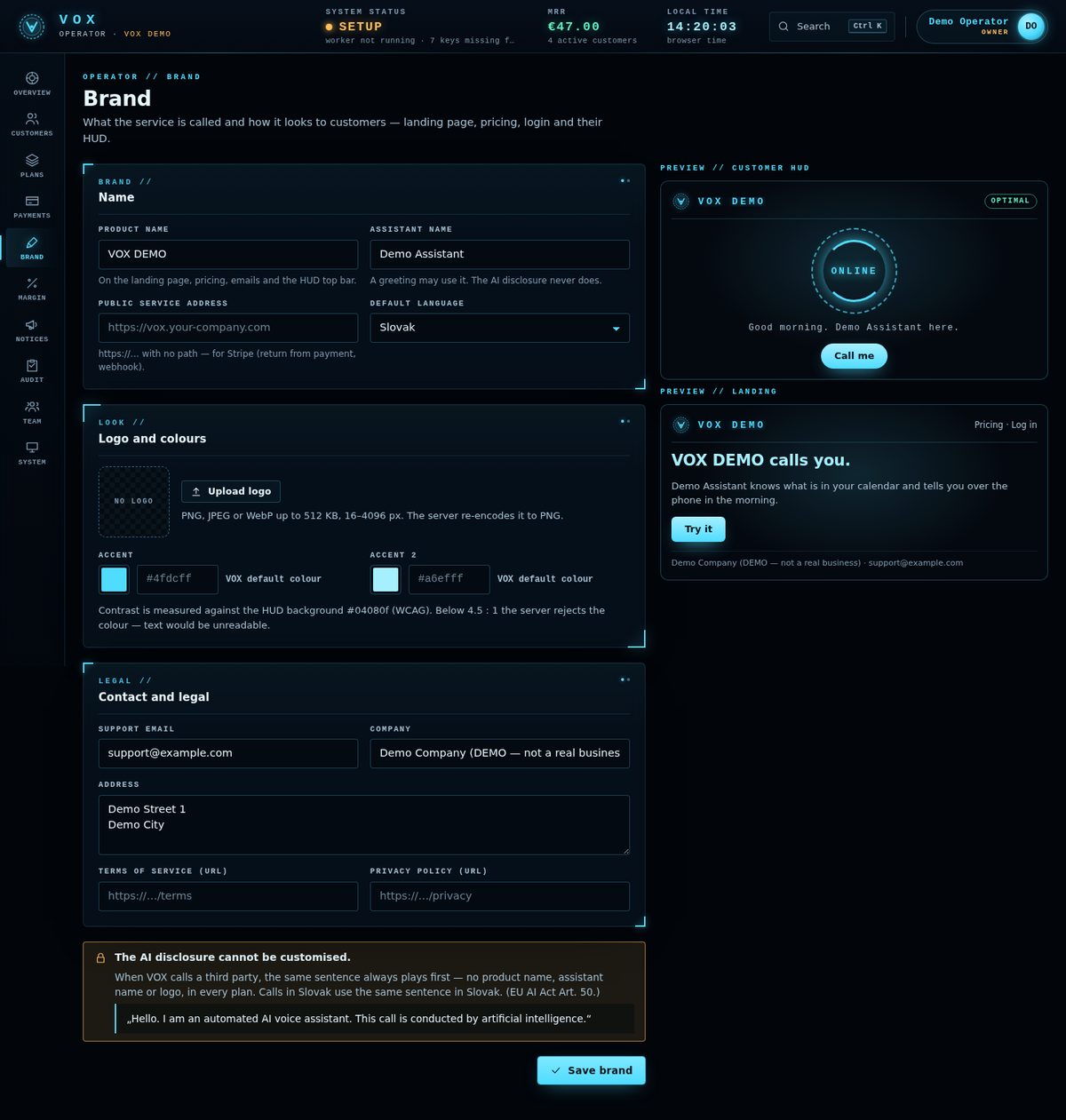
In SaaS mode the brand is set in the operator panel, with no code change and no rebuild. One thing can never be branded: the AI disclosure.
01Operator panel → Brand
| Field | Notes |
|---|---|
| Product name, assistant name | Shown on the public site, in consoles and e-mails. |
| Logo | PNG, JPEG or WebP, up to 512 KB. It is re-encoded on upload. |
| Two accent colours | Contrast-checked before saving. |
| Support e-mail | Shown to customers. |
| Legal texts | Company, address, terms URL, privacy URL. |
| Default language | English (default) or Slovak for calls and texts. |
| Public service address | The base URL of your site. Used for Checkout return URLs, e-mail links and the Stripe webhook URL. |
Sign-up on/off and the trial plan for new sign-ups are on the Plans page.
02What cannot be branded
The AI disclosure cannot be branded, renamed or edited. A branding field that tries is refused with DISCLOSURE_NOT_BRANDABLE. See Call rules.
03Custom domain
A custom domain is your reverse proxy plus DNS. Use one host name for everything and set VOX_PUBLIC_HOST to it: Twilio webhooks and the Google OAuth redirect are built from VOX_PUBLIC_HOST, while Checkout return URLs and the webhook URL use the branding base URL. With one host, all of them agree and the login cookie is present when Google redirects back.
04Language
The console, public site, operator panel, CLI and these docs are in English. What is spoken on a call or sent to the user's phone follows the call language: English (default) or Slovak (--lang en|sk, or the profile's language). A call is placed only in a language for which a disclosure exists. Adding another call language means adding a disclosure text and translations in code; that is custom work.
05Single-user installs
Single-user mode has no Brand page. Changing the look of the console means editing its static files in app/voice/admin/static/ (no build step). Keep your changes in git so an update is a merge (Updating).