
● Start · 10 minutes
Quick start
the console running.
The shortest way from the package to the VOX console on a Linux server with Docker, and a list of what is still missing before the first call. If Docker is not an option, see Installation.
01Before you start
- A Linux machine with Docker Engine and Compose v2 (
docker compose versionanswers). The compose file uses host networking, which is a Linux feature. - The package unpacked in a folder without spaces, for example
/opt/mikodes-vox. - No keys yet. You can enter them later in the console.
No keys needed to look around
The console, the onboarding questions and python -m voice check all run without a single key. Only calls, research and mail triage need keys.
02The ten minutes
- Optional: create the key fileKeys can also be entered in the console later. If you use the file, protect it.
cp deploy/vox.env.example deploy/vox.env && chmod 600 deploy/vox.env - Build and start
docker compose up -d --build - Find the console addressIt is printed once, with its token.
You see a line likedocker compose logs vox | grep "VOX admin"VOX admin http://127.0.0.1:8766/#token=…. On a remote server open an SSH tunnel first:ssh -L 8766:127.0.0.1:8766 your-server, then open the address on your own computer. - Answer the 12 questionsThis builds the profile. It never calls anyone.
docker compose run --rm vox node src/run.js - See what is missingLists every missing key at once, with no network access.
docker compose run --rm vox python -m voice check
03What you should see
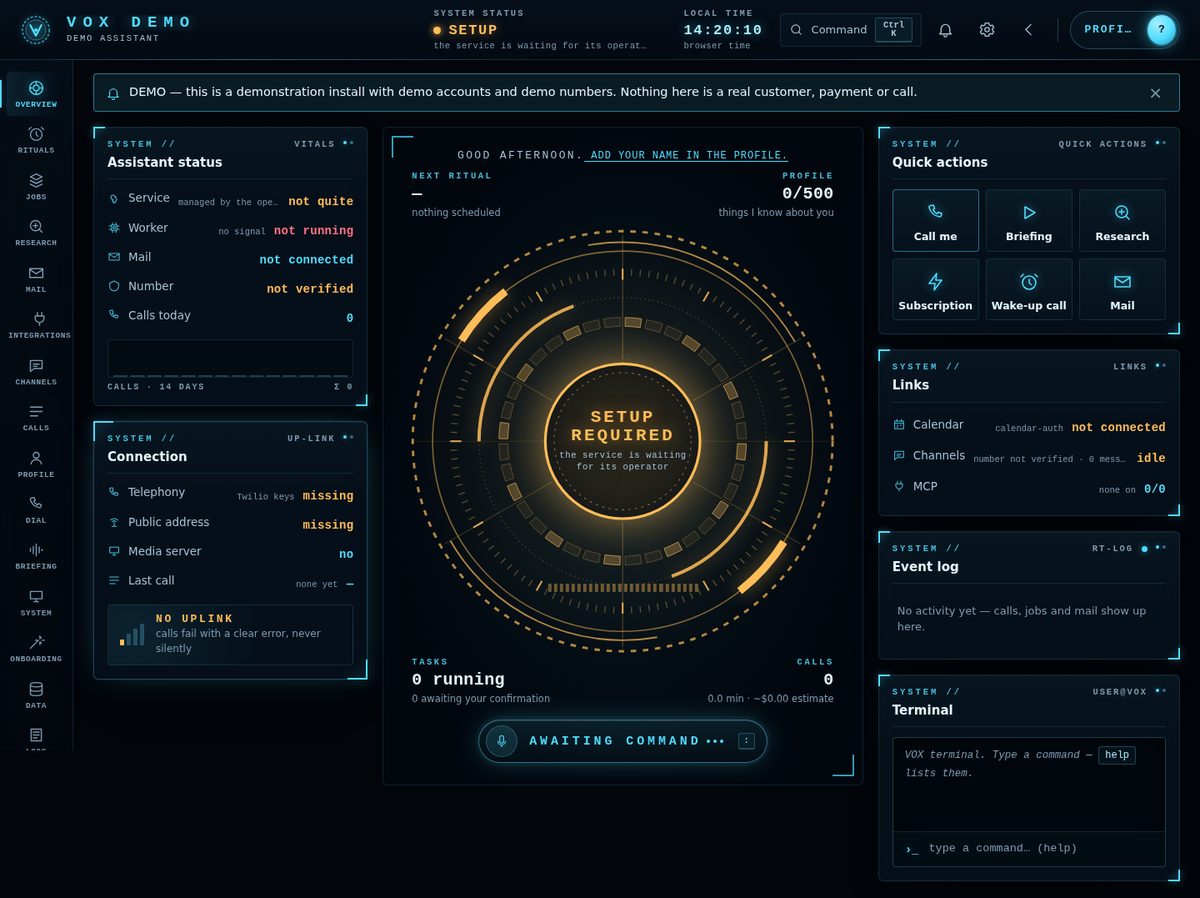
- The console opens on Overview with the status SETUP: the service is waiting for its keys.
checkexits with code 2 and names the seven settings a call needs (Configuration).- The media server does not start yet. It starts only when every required key and the sentence-splitting data are present, after a restart:
docker compose restart vox.
Never put the console on the internet
Not behind a proxy, not "for a minute". Whoever has its token can read the profile and transcripts and place calls. Use the SSH tunnel.
Next
Enter the keys (Configuration), put a TLS proxy in front of the media server (Deployment), verify your own number (Console) and place the first call to yourself.